ZoomInfo as a Service
Playbook

+

Turn Your Data Into Dollars with Quantum's RevEfficiency Model and ZoomInfo
Introduction to Quantum's ZoomInfo as a Service Playbook
Welcome to Quantum's ZoomInfo as a Service Playbook, a comprehensive guide designed to help companies fully leverage their ZoomInfo data to drive leads, revenue, and business growth.
Maximize Your Investment:
Many companies have access to ZoomInfo data but may not be utilizing it to its full potential. Our goal is to show you how you can extract maximum value from your ZoomInfo subscription and turn data into actionable insights.
Our playbook provides step-by-step guidance, proven strategies, and best practices to help you harness the full power of ZoomInfo. Whether you’re looking to improve lead generation, enhance revenue growth, or gain a competitive edge, this playbook is your essential resource for unlocking the true potential of your data.
Let's dive in and explore how you can transform data into growth with Quantum's expertise and support.
Strategy:
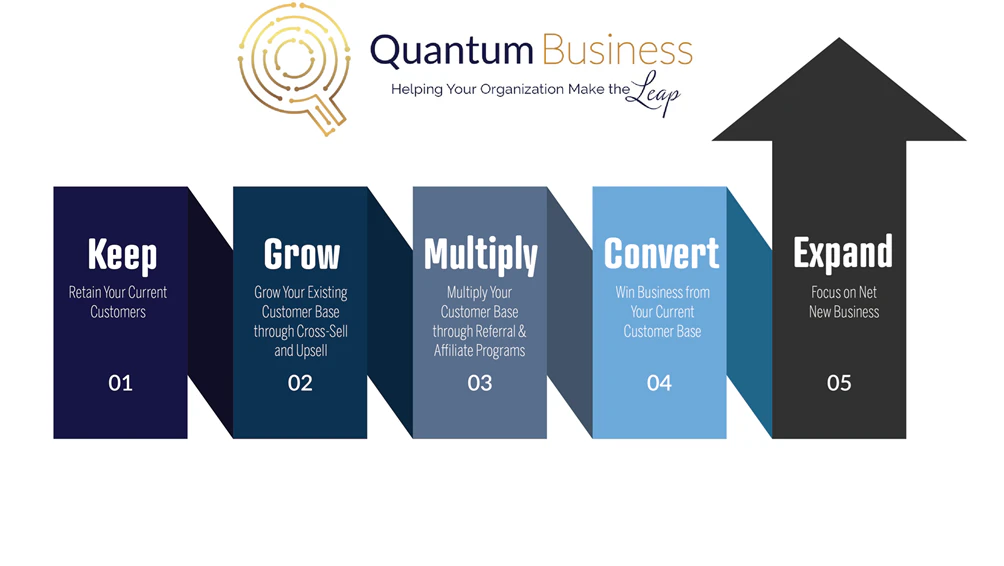
To implement our approach, we utilize Quantum's RevEfficiency Model, which consists of the following steps:
Step 1: Retain
Ensure customer satisfaction and loyalty by providing exceptional service and value.
Step 2: Grow
Enhance existing relationships and identify opportunities for upselling and cross-selling.
Step 3: Multiply
Leverage customer successes into referrals and leverage champions.
Step 4: Convert
Turn prospects into loyal customers through targeted marketing and personalized outreach.
Step 5: Expand
Broaden your market reach and explore net new business opportunities to drive sustained growth.
Step #1 Keep
Client Retention
Know Your Current Customers
The process begins with a deep understanding of your existing customers. Building strong relationships and ensuring customer satisfaction is the cornerstone of long-term success. Studies show that acquiring a new customer can cost five times more than retaining an existing one. Moreover, increasing customer retention rates by just 5% can boost profits by 25% to 95%. This demonstrates the significant impact of focusing on those who are already engaged with your business.
Focus on Revenue Closest to You:
By concentrating on your current customer base, you can drive revenue more effectively. Existing customers are more likely to buy from you again and are typically more open to upselling and cross-selling opportunities. In fact, the probability of selling to an existing customer is 60-70%, compared to 5-20% for a new prospect. This makes it clear that the revenue closest to you—your current customers—should be a primary focus.
Our Process Starts with the Basics:
Customer Data Analysis
We begin by analyzing your customer data to understand the depth and accuracy of the information you have for your current customers. Ensuring that your CRM is up-to-date and comprehensive is crucial for effective customer relationship management and outreach.
Key Areas of Focus
Right Customer Contacts:
- Do you have the right customer contacts in your database?
- Are the contacts in your database the key decision-makers with decision-making power?
- How many CEOs/heads of companies are currently in your CRM?
- How many heads of IT and heads of Finance customer contacts are in your CRM?
Critical Contact Information:
- Do you have critical contact information for your current customers, including mobile phone numbers, direct dial phone numbers, and email addresses?
- Do you have backup contacts in case a key contact leaves an organization?
Database Enrichment and Maintenance:
When was your last database enrichment?
Contact Data Degradation Rate:
Annually: On average, B2B data decays at a rate of approximately 30% per year.
Monthly: This translates to about 2.5% per month.
Job Changes:
Annually: About 20-25% of employees change jobs each year, significantly impacting contact data accuracy.
Monthly: Approximately 1.75-2% of employees change jobs each month.
By systematically evaluating these areas, we ensure that your customer data is accurate, comprehensive, and actionable. This foundational step is critical for maximizing the effectiveness of your customer relationship management and driving successful outreach campaigns.
Comprehensive Data Integration
Seamless Integration for Enhanced Efficiency
Once we have thoroughly analyzed the data in your current system, the next step is to set up the integration between ZoomInfo and your CRM. This integration ensures that your CRM is enriched with accurate, up-to-date information, enabling more effective customer management and targeted outreach.
ZoomInfo Data Enrichment Process:
Filling in Missing Contact Information:
- Complete Profiles: Populate incomplete customer records with missing details such as job titles, email addresses, phone numbers, and other essential contact information.
- Direct Dials and Mobile Numbers: Ensure that your records include direct-dial phone numbers and mobile numbers for key contacts, improving your ability to reach decision-makers directly.
Locating the Right Contacts:
- Key Decision-Makers: Identify and add the key decision-makers within your target accounts, including CEOs, heads of IT, and heads of Finance.
- Backup Contacts: Add secondary contacts to your CRM to ensure continuity in communication if a primary contact leaves the organization.
- Hierarchy Mapping: Understand the organizational structure by mapping out the hierarchy within target accounts, helping you navigate and target the right individuals effectively.
Ongoing Data Maintenance:
- Regular Updates: Schedule regular data enrichment cycles to keep your contact information current. This includes refreshing records to account for job changes and new hires.
- Data Degradation Management: Mitigate the effects of data decay (approximately 30% annually) by continually updating your CRM with fresh data from ZoomInfo.
- Automated Synchronization: Utilize automated tools to synchronize updates between ZoomInfo and your CRM, ensuring real-time data accuracy and consistency.
By integrating ZoomInfo with your CRM, you transform your customer data into a powerful asset that drives more personalized and effective communication strategies. This process not only fills in missing gaps but also enhances the quality and reliability of your customer records, setting a strong foundation for improved business growth and success.
Leveraging ZoomInfo for Comprehensive Customer Insights
ZoomInfo offers a suite of powerful features that can help you stay informed about your current customers' activities and changes within their organizations. By utilizing these features, you can gain valuable insights and proactively address customer needs. Here are the key features of ZoomInfo that you can be utilized:
Automating Customer Insights with ZoomInfo
Leveraging ZoomInfo's comprehensive data and powerful features allows you to automate the process of gathering and analyzing customer insights. This automation ensures that your team is always equipped with the latest information, enabling proactive and effective customer management. Here’s how these findings can be automated:
- Automated Alerts for Key Contact Moves:
- Set up real-time alerts in ZoomInfo to notify you when key contacts change positions or move to different companies. This automation ensures you can quickly adjust your outreach and maintain strong relationships.
- Automated Tracking of Champion Moves:
- Configure ZoomInfo to automatically track internal champions’ career moves. This allows you to identify opportunities for new sales or strengthen existing relationships as they transition to new roles.
- Automated Monitoring of Customer Growth Indicators:
- Use ZoomInfo to automatically monitor indicators of customer growth, such as new office openings or increased employee headcount. Automated tracking helps you stay informed and ready to support their expansion needs.
- Automated Analysis of Customer Intent:
- Leverage ZoomInfo’s intent data to automatically identify what your customers are researching and interested in. This automation can reveal if they are exploring competitive solutions or looking for products and services you offer, enabling you to tailor your outreach effectively.
- Automated Tracking of Technology Purchases:
- Set up ZoomInfo to automatically track your customers’ technology acquisitions. This ensures you are aware of their latest purchases and can offer complementary products or services.
- Automated Monitoring of Customer Job Postings:
- Use ZoomInfo to automatically monitor job postings from your customers. This data can provide insights into their hiring needs and business priorities, helping you align your solutions with their growth plans.
- Automated Updates on Marketplace Changes:
- Configure ZoomInfo to keep you updated on changes and trends within your customers’ industries. Automated alerts on regulatory changes, market dynamics, and competitive movements allow you to anticipate challenges and opportunities.
- Automated Alerts for Mergers & Acquisitions:
- Use ZoomInfo to set up alerts for mergers and acquisitions involving your customers. This automation helps you stay informed about significant changes and adjust your strategies accordingly.
9 Automated Monitoring of Consolidation Activities:
- Configure ZoomInfo to automatically identify when customers are consolidating operations. This information helps you understand the implications and tailor your approach to align with their new organizational structure.
By automating these processes with ZoomInfo, you ensure that your team is always equipped with the most current and relevant information. This automation streamlines your workflow, enhances customer relationships, and enables you to deliver timely and tailored solutions that meet your customers' evolving needs.
Grow
Cross-Sell
Upsell
Growing Your Current Customer Base: The Next Step in Customer Success
After successfully retaining your current customers, the next crucial step is to focus on growing these relationships. Leveraging existing customer connections is often more cost-effective and rewarding than acquiring new customers.
Why Focus on Growing Current Customers?
Easier and More Profitable:
- Cost-Effective: Studies show that acquiring a new customer can cost five times more than retaining an existing one. Moreover, as already cited, the probability of selling to an existing customer is 60-70%, compared to 5-20% for a new prospect.
- Higher Conversion Rates: Existing customers are more likely to purchase additional products or services because they already trust your brand. This trust translates into higher conversion rates for cross-sell and upsell opportunities.
Leaving Money on the Table:
- Untapped Potential: Many businesses fail to fully leverage their existing customer base, leaving substantial revenue opportunities unexplored. Our analysis indicates that up to 25% of your current customers should be prime candidates for cross-sell opportunities.
Insights from CRM Data Analysis
When we initially analyze data in our customers' CRMs, we typically find the following:
- Misalignment with Key Buyer Personas:
- Less than 5% of the contacts in their CRM match their key buyer personas. This indicates a significant gap in targeting the right decision-makers who can drive purchasing decisions.
- Incomplete Contact Information:
- Of the contacts that do match their key buyer personas:
- Less than 40% have mobile numbers.
- Less than 50% have direct dial numbers.
- Less than 85% have email addresses.
- Of the contacts that do match their key buyer personas:
This incomplete and outdated information can hinder your ability to effectively reach and engage your key contacts, ultimately impacting your cross-sell and upsell efforts.
Segment Your Customer Base
Identify Opportunities: Segment your customers based on their current products and services, and identify those who would benefit from additional offerings.


Filling Gaps: Utilize ZoomInfo to identify and fill in information for key decision-makers for additional products and services.
Intent Data and Insights:
- Research Activities: Monitor what your customers are researching online to understand their current needs and interests.
- Competitive Intelligence: Identify if your customers are exploring competitive solutions, allowing you to proactively address their concerns and highlight your value proposition.
- Workflow Automation: Create automated alerts and reports based on intent data to notify your sales and marketing teams when customers show interest in specific topics or competitors.
Utilizing ZoomInfo Triggers to Identify Cross-Sell and Upsell Opportunities
ZoomInfo provides robust tools to set up triggers that help you monitor and track key activities and changes within your customer base. These triggers can automatically identify opportunities for cross-sell and upsell, ensuring you are always positioned to provide timely and relevant solutions. Here’s how you can leverage ZoomInfo to set up effective triggers:
Key Contact Moves
Trigger Setup:
- Configure triggers to alert you when key contacts within your customers' organizations change roles or move to different companies.
Opportunity Identification:
- A change in key contacts, such as new decision-makers in IT or finance, can signal an opportunity to introduce additional products and services or reinforce the value of existing solutions.
Champion Moves
Trigger Setup:
- Set up triggers to notify you when internal champions—advocates for your solutions—move to new positions or companies.
Opportunity Identification:
- Champion moves can create opportunities to expand your reach within the new organization or strengthen your relationship in the current one, leveraging their advocacy to introduce new offerings.
Customer Growth Indicators
Trigger Setup:
- Create triggers to monitor indicators of customer growth, such as job postings, new office locations, or increased employee headcount.
Opportunity Identification:
- Growth indicators suggest that the customer may need additional resources or solutions to support their expansion, providing a prime opportunity for cross-sell and upsell.
Customer Intent Data
Trigger Setup:
- Use intent data triggers to track what your customers are researching online, including specific topics, products, or competitive solutions.
Opportunity Identification:
- Intent data can reveal if customers are exploring areas where you can offer complementary products or services, allowing you to tailor your outreach to meet their current interests and needs.
Technology Purchases
Trigger Setup:
- Set up triggers to alert you when customers purchase new technologies that align with your offerings.
Opportunity Identification:
- New technology purchases often necessitate additional tools and services, creating an ideal moment to propose complementary solutions.
Job Postings
Trigger Setup:
- Monitor job postings from your customers, particularly for roles in IT, finance, or operations.
Opportunity Identification:
- New job postings can indicate departmental growth or new initiatives, suggesting a need for additional products or services to support these changes.
Marketplace Changes
Trigger Setup:
- Establish triggers to keep you informed about significant marketplace changes, such as industry regulations, market dynamics, or competitor movements.
Opportunity Identification:
- Awareness of marketplace changes allows you to proactively address emerging customer needs and position your solutions as timely and relevant.
Mergers & Acquisitions
Trigger Setup:
- Configure triggers to notify you about mergers and acquisitions involving your customers.Opportunity Identification:
- Mergers and acquisitions can lead to organizational restructuring and new requirements for integrated solutions, presenting opportunities for cross-sell and upsell.
Consolidation Activities
Trigger Setup:
- Set up triggers to identify when customers are consolidating operations, such as merging departments or centralizing functions.
Opportunity Identification:
- Consolidation activities often require streamlined processes and unified solutions, creating a need for additional products and services.
By setting up these triggers in ZoomInfo, you can stay ahead of key changes and activities within your customer base, ensuring you never miss an opportunity for cross-sell and upsell. Automated alerts and real-time notifications enable your team to respond promptly and strategically, enhancing customer relationships and driving business growth. This proactive approach allows you to continuously deliver value to your customers and strengthen your position as a trusted partner.
Multiply
Referrals
Leverage Champion Moves
The next step in the RevEfficiency Model is to leverage your current customers to multiply into similar customers through referrals and champion moves. Utilizing ZoomInfo, you can identify and track these valuable opportunities. By monitoring key customer activities and changes, ZoomInfo helps you pinpoint when to ask for referrals and capitalize on champion moves, enabling you to expand your reach and attract new, like-minded customers effectively.
Timing Your Referral Requests
- Real-Time Alerts: Set up real-time alerts for significant positive changes within customer organizations, such as successful project completions, renewals, or expansions. These are ideal moments to request referrals.
- Champion Moves: Track when internal champions within your customer organizations move to new roles or companies. These champions can be excellent sources of referrals in their new positions.
Leveraging ZoomInfo to Identify Key Decision Makers
Once you have received a referral, it is crucial to identify other key decision-makers within the target company to ensure a comprehensive approach. ZoomInfo provides the tools necessary to efficiently locate and engage with the appropriate contacts at the referred company. Here’s how you can leverage ZoomInfo for this purpose:
Identifying Surrounding Decision Makers
1. Comprehensive Contact Database:
- Access to Extensive Data: ZoomInfo’s extensive database includes detailed contact information for professionals across various departments and roles within an organization. This allows you to identify key decision-makers who influence purchasing decisions.
- Hierarchical Mapping: Utilize ZoomInfo’s hierarchical mapping features to understand the organizational structure and pinpoint influential stakeholders surrounding the referred contact.
2. Expanding Your Reach:
- Role-Based Search: Conduct role-based searches within the target company to find contacts in relevant positions, such as IT managers, finance directors, and department heads, who may also be involved in the decision-making process.
- Departmental Insights: Identify additional contacts within specific departments that align with your products or services, ensuring that you cover all potential influencers and decision-makers.
Utilizing ZoomInfo to Locate Appropriate Contacts
1. Targeted Searches:
- Advanced Filters: Use ZoomInfo’s advanced filtering options to narrow down your search based on criteria such as job title, department, location, and seniority level. This helps you locate the most relevant contacts quickly and efficiently.
- Industry-Specific Searches: Tailor your searches to focus on specific industries, ensuring that you find contacts who understand the unique needs and challenges of their sector.
2. Real-Time Data:
- Updated Information: Leverage ZoomInfo’s real-time data updates to ensure that the contact information you access is current and accurate. This reduces the likelihood of reaching out to outdated or incorrect contacts.
- Job Change Alerts: Set up alerts to notify you of any job changes within the target company, allowing you to adapt your strategy and maintain contact with relevant decision-makers.
3. Contact Enrichment:
- Detailed Profiles: ZoomInfo provides enriched contact profiles, including direct phone numbers, email addresses, and social media links, making it easier to reach out and establish communication with key individuals.
- Professional Backgrounds: Access detailed professional backgrounds and career histories of potential contacts to tailor your outreach and build more meaningful connections.
Convert
More Opportunities
More Closed Deals
Leverage High-Potential Opportunities with ZoomInfo
During the convert stage, it is crucial to identify and prioritize high-potential opportunities to maximize your sales efforts. ZoomInfo offers a suite of tools designed to help you identify buying signals, access actionable insights, automate account discovery, and enhance account data. Here’s how you can leverage these features effectively:
Intent Data
Identify Buying Signals and Prioritize High-Intent Accounts:
- Monitor Research Activities: Utilize intent data to track what your potential customers are researching online. This helps you understand their current interests and needs.
- Prioritize High-Intent Accounts: Focus your efforts on accounts showing strong buying signals, ensuring you target those most likely to convert.
Scoops
Access Actionable Insights and Company Updates:
- Leadership Changes: Stay informed about changes in leadership within your target accounts. New leaders often bring new initiatives and opportunities for partnership.
- Company Developments: Keep track of significant company updates, such as expansions, product launches, and other strategic moves that may indicate a need for your solutions.
Saved Searches and Alerts
Automate Account Discovery and Stay Informed About Changes:
- Automated Discovery: Set up saved searches to automatically identify new accounts that match your target criteria. This ensures a steady pipeline of potential opportunities.
- Real-Time Alerts: Configure alerts to notify you of important changes within your target accounts, such as job changes, funding rounds, and other relevant events. This enables timely and informed engagement.
Data Enrichment
Enhance and Verify Account Data for Accuracy:
- Complete Profiles: Use data enrichment to fill in missing information and verify existing data for your target accounts. Accurate data is crucial for effective outreach and engagement.
- Regular Updates: Ensure your CRM is continuously updated with the latest contact information, job titles, email addresses, and phone numbers, providing your sales team with reliable data to work with.
Utilizing ZoomInfo to Enrich Data for Segmented Lists
Maximize the effectiveness of your segmented lists by leveraging ZoomInfo to enrich data across various categories. This ensures your outreach is based on the most accurate and comprehensive information available. Here’s how you can utilize ZoomInfo for different segments:
Past Deals
- Enhance Contact Information: Update and verify contact details to re-engage past clients with new offers or solutions.
Stalled Deals
- Identify Decision-Makers: Find and engage with key stakeholders who can help move the deal forward.
Lost Deals (for Re-Engagement)
- Address New Needs: Use enriched data to understand changes in the prospect's organization that might open the door for a renewed pitch.
MQLs/SQLs
- Refine Targeting: Ensure Marketing Qualified Leads (MQLs) and Sales Qualified Leads (SQLs) have complete and accurate contact information for effective follow-up.
Form Fills
- Validate Information: Confirm and enrich the details provided in form fills to enhance lead quality.
Event Attendees (Webinars, Conferences, Seminars)
- Detailed Profiles: Enrich attendee lists with additional contact and company information to personalize follow-up communications.
Webinar Sign-Ups
- Engage Attendees: Update contact details and segment based on webinar participation and interests.
Shows Who Didn’t Turn Into A Deal
- Re-Engage Prospects: Identify and address reasons why these leads didn’t convert and tailor your outreach to overcome those obstacles.
No Shows
- Follow-Up Opportunities: Enrich contact information and re-engage no-shows with relevant content or event highlights.
High-Intent Website Visitors and Actions
- Behavioral Insights: Enrich data on high-intent visitors to personalize outreach based on their actions and interests.
Referral Leads
- Build Relationships: Use enriched data to engage referral leads with targeted messages and offers.
Existing Customers for Upsell/Cross-Sell
- Identify Opportunities: Enrich customer data to uncover additional needs and opportunities for upselling or cross-selling.
Inactive Customers
- Reactivation Campaigns: Update and validate contact details to re-engage inactive customers with new solutions or offers.
Competitor's Customers
- Competitive Intelligence: Enrich data on competitor’s customers to understand their needs and position your offerings effectively.
Chatbot Interactions
- Enhance Follow-Up: Use enriched data from chatbot interactions to personalize follow-up communications and offers.
Survey Respondents
- Detailed Insights: Enrich survey respondent data to segment and target them based on their feedback and interests.
Request for Information (RFI) Submissions
- Timely Engagement: Ensure accurate and comprehensive data for timely and relevant follow-up on RFI submissions.
Inbound Calls
- Capture and Enrich: Enrich data from inbound calls to ensure follow-up actions are personalized and effective.
Expand
Net New Business
Utilizing ZoomInfo for Net New Business
ZoomInfo provides a comprehensive set of tools designed to help you identify and engage with new business opportunities efficiently. Here’s how you can leverage these features to drive net new business:
Saved Searches
- Automate Discovery: Set up saved searches to automatically discover new accounts that match your ideal customer profile. This ensures you continuously identify new prospects without manual effort.
- Regular Updates: Receive regular updates on new leads that meet your criteria, keeping your pipeline fresh and relevant.
Intent Data
- Identify Buying Signals: Utilize intent data to track what potential customers are researching online. This helps you prioritize high-intent accounts that are more likely to be in the market for your solutions.
- Targeted Outreach: Focus your marketing and sales efforts on accounts showing strong buying signals, increasing your chances of conversion.
Scoops
- Actionable Insights: Access actionable insights and company updates such as changes in leadership, funding rounds, and other significant events. This information can inform your outreach strategy and timing.
- Timely Engagement: Engage with prospects based on real-time updates to maximize the relevance and impact of your communication.
Website Visitors
- Identify Visitors: Use ZoomInfo to identify high-intent website visitors who are showing interest in your products or services.
- Personalized Follow-Up: Reach out to these visitors with personalized messages based on their browsing behavior and interests.
Workflows
- Streamline Processes: Create automated workflows to manage lead generation, nurturing, and follow-up processes. This ensures consistent and timely engagement with new prospects.
- Efficiency and Consistency: Automate repetitive tasks to save time and ensure no lead falls through the cracks.
CoPilot
- Sales Assistance: Leverage CoPilot to automate routine sales tasks, such as follow-ups and meeting scheduling. This allows your sales team to focus on high-value activities.
- Enhanced Productivity: Use CoPilot to streamline your sales process, ensuring efficient handling of new business opportunities.
Lead Forms
- Capture Leads: Integrate lead forms on your website to capture information from interested prospects. ZoomInfo can enrich this data to provide a complete profile of each lead.
- Immediate Follow-Up: Automate the follow-up process to ensure timely engagement with new leads captured through your forms.
Advanced Search Filters
- Refine Searches: Use advanced search filters to narrow down your target audience based on specific criteria such as industry, company size, location, and more.
- Precise Targeting: Ensure your outreach is highly targeted and relevant, improving the chances of successful engagement.
Enrichment
- Complete Profiles: Enrich your contact database with accurate and comprehensive information, including email addresses, phone numbers, and social media profiles.
- Accurate Data: Ensure your sales and marketing teams have the most up-to-date information to engage with new prospects effectively.
Targeted Outreach Lists
- Segmented Lists: Create segmented outreach lists based on specific criteria, ensuring your messages are tailored to the needs and interests of each group.
- Effective Campaigns: Use these lists to run highly targeted and coordinated calling and marketing campaigns that resonate with your audience.
Job Changes and Promotions
- Track Movements: Monitor job changes and promotions within your target accounts to identify new opportunities for engagement.
- Strategic Outreach: Reach out to individuals in new roles who may have different needs or be more open to exploring new solutions.
Our Role
Quantum's Role
At Quantum, our goal is to empower your business with a structured, efficient, and scalable approach to leveraging ZoomInfo. We provide expert guidance, handle the technical integration, and ensure your system operates seamlessly. Here’s how we support your success:
Keeping You on Track
- Strategic Roadmapping: We help you develop a clear, actionable plan for utilizing ZoomInfo effectively. This includes setting measurable goals, identifying key metrics, and outlining the steps needed to achieve your objectives.
- Ongoing Monitoring: Quantum continuously monitors your progress, providing regular updates and adjustments to keep you aligned with your strategic roadmap.
Systemized Approach
- Best Practices Implementation: We bring industry best practices to your ZoomInfo deployment, ensuring you use the platform to its fullest potential. This includes optimizing your data collection, enrichment, and utilization processes.
- Workflow Automation: Quantum sets up automated workflows that streamline your lead generation, nurturing, and follow-up processes. This ensures consistency and efficiency across your sales and marketing efforts.
Expert Guidance
- Professional Expertise: Our team of experts brings deep knowledge of ZoomInfo and CRM systems. We provide insights and recommendations tailored to your specific business needs and objectives.
- Training and Support: Quantum offers comprehensive training sessions for your team, ensuring they are well-versed in using ZoomInfo and understand how to integrate it into their daily operations effectively. We also provide ongoing support to address any questions or issues that arise.
Scalable Solutions
- Customizable Integration: We handle the technical integration between your CRM and ZoomInfo, ensuring a seamless flow of data. Our solutions are scalable, allowing you to easily adapt and grow your system as your business needs evolve.
- Adaptable Infrastructure: Quantum’s scalable infrastructure ensures that as your business grows, your ZoomInfo setup can expand to accommodate increased data volume and complexity without compromising performance.
Technical Integration
- Seamless Data Sync: We ensure that your CRM and ZoomInfo are fully integrated, enabling real-time data synchronization. This integration eliminates data silos, providing your team with access to accurate and up-to-date information.
- Enhanced Data Quality: Through meticulous data mapping and validation processes, Quantum ensures that the information flowing between ZoomInfo and your CRM is accurate, complete, and reliable.
Quantum’s Value Proposition
By partnering with Quantum for ZoomInfo as a Service, you gain a strategic ally dedicated to optimizing your use of data and technology. We help you:
- Maximize ROI: Ensure you get the highest return on your investment in ZoomInfo through expert guidance and efficient use of the platform.
- Boost Efficiency: Streamline your sales and marketing processes, freeing up your team to focus on high-value activities.
- Drive Growth: Leverage accurate, enriched data to identify and capitalize on new business opportunities.
In essence, Quantum acts as the backbone of your ZoomInfo implementation, providing the structure, expertise, and support needed to transform data into actionable insights and drive your business forward.